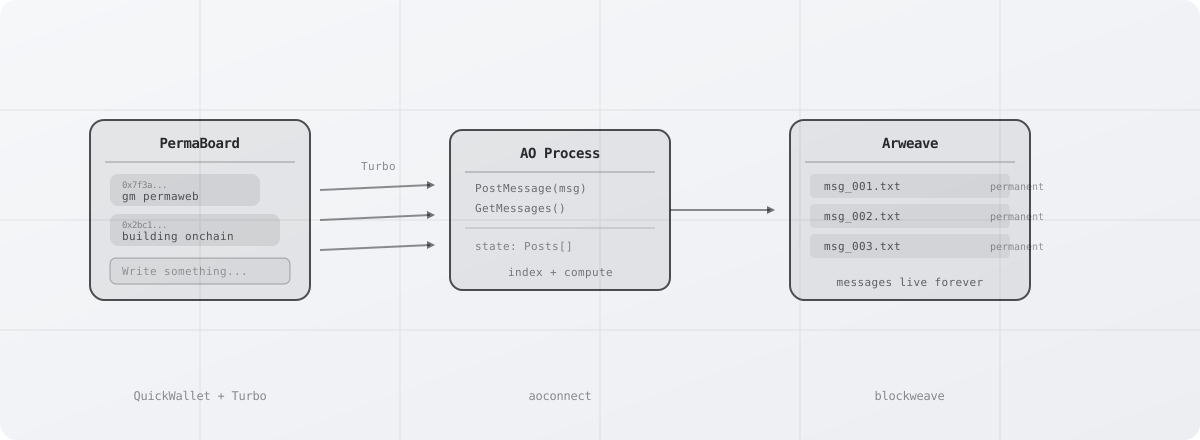
You are going to build a permanent message board. Messages are stored on Arweave through Turbo, signed with QuickWallet (no browser extension), and indexed by an AO process so you can read them back. The whole thing deploys to the permaweb as a static site that nobody can take down.
What You'll Build
A single-page app where anyone can post short messages. Each message becomes a permanent Arweave transaction. An AO process keeps an index of all messages so the frontend can fetch them in one call. The stack:
Note: This guide walks through each piece individually first, then provides a complete copy-paste file at the end in the "Putting It Together" section.
- QuickWallet generates a disposable Arweave wallet in the browser. No extensions, no seed phrases, no setup.
- Turbo bundles your signed data items and posts them to Arweave with instant availability. Free for uploads under 105 KiB.
- AO runs a Lua process onchain that stores message metadata and serves it back via dryrun queries.
Project Setup
Scaffold a Vite project and install dependencies:
npm create vite@latest message-board -- --template vanilla-ts
cd message-board
npm install @permaweb/aoconnect quick-wallet buffer
QuickWallet needs a Buffer polyfill in the browser. Add this to the top of your src/main.ts:
import { Buffer } from 'buffer';
globalThis.Buffer = Buffer;
TypeScript Declarations
Create a src/global.d.ts file so TypeScript recognizes the global Buffer and wallet types:
import { Buffer } from "buffer";

declare global {
  var Buffer: typeof Buffer;

  interface Window {
    arweaveWallet?: {
      sign: (...args: any[]) => Promise<any>;
      getActiveAddress: () => Promise<string>;
    };
  }
}

export {};
The AO Process
AO processes are Lua scripts that run on the AO network with their state stored permanently on Arweave. Create a file called message-board.lua in your project root directory:
-- message-board.lua
Posts = Posts or {}

Handlers.add("PostMessage", "PostMessage", function(msg)
  local post = {
    id = msg.Id,
    author = msg.From,
    text = msg.Data,
    timestamp = msg.Timestamp
  }
  table.insert(Posts, post)
  msg.reply({ Data = "posted" })
end)

Handlers.add("GetMessages", "GetMessages", function(msg)
  msg.reply({ Data = require("json").encode(Posts) })
end)
Two handlers: PostMessage adds a message to the list, GetMessages returns all of them as JSON.
Deploy the process
Install the AO CLI and spawn your process:
npm install -g https://get_ao.g8way.io
aos message-board --load message-board.lua
This gives you a process ID. Save it; you will need it in the frontend. It looks something like dY5Sp3zF8M....
QuickWallet Setup
QuickWallet creates a disposable Arweave wallet in the browser. Import it dynamically so it only loads on the client:
async function getWallet() {
  const { QuickWallet } = await import('quick-wallet');
  const address = await QuickWallet.getActiveAddress();
  return { QuickWallet, address };
}
That is all you need. No configuration, no provider setup. The wallet persists in the browser session so the address stays consistent while the tab is open.
Posting Messages
Posting a message is three steps: sign a data item with QuickWallet, upload it through Turbo, then notify the AO process.
import { message, createDataItemSigner } from '@permaweb/aoconnect';

const PROCESS_ID = 'YOUR_PROCESS_ID_HERE';

async function postMessage(text: string) {
  const { QuickWallet } = await import('quick-wallet');

  // 1. Sign a data item containing the message
  const encoder = new TextEncoder();
  const data = encoder.encode(text);

  const signedBytes = await QuickWallet.signDataItem({
    data,
    tags: [
      { name: 'Content-Type', value: 'text/plain' },
      { name: 'App-Name', value: 'PermaBoard' },
      { name: 'Type', value: 'post' },
    ],
  });

  // 2. Upload through Turbo for instant availability
  const res = await fetch('https://upload.ardrive.io/v1/tx', {
    method: 'POST',
    body: new Uint8Array(signedBytes),
    headers: {
      'Content-Type': 'application/octet-stream',
      'Accept': 'application/json',
    },
  });

  if (!res.ok) throw new Error(`Upload failed (${res.status})`);
  const { id: txId } = await res.json();

  // 3. Notify the AO process
  await message({
    process: PROCESS_ID,
    tags: [{ name: 'Action', value: 'PostMessage' }],
    data: text,
    signer: createDataItemSigner(window.arweaveWallet),
  });

  return txId;
}
The message text is now stored permanently on Arweave (via step 2) and indexed in the AO process (via step 3). The txId returned by Turbo is immediately accessible at https://arweave.net/${txId}.
Reading Messages
Query the AO process with dryrun to get all messages without sending a transaction:
import { dryrun } from '@permaweb/aoconnect';

async function getMessages() {
  const result = await dryrun({
    process: PROCESS_ID,
    tags: [{ name: 'Action', value: 'GetMessages' }],
  });

  const data = result.Messages?.[0]?.Data;
  if (!data) return [];

  return JSON.parse(data);
}
dryrun is free. It evaluates the handler without posting a message to the network. The AO process returns the current list of posts from its state.
Putting It Together
Here is a complete src/main.ts that wires up the post form and message list:
import { Buffer } from 'buffer';
globalThis.Buffer = Buffer;

import { message, dryrun, createDataItemSigner } from '@permaweb/aoconnect';

const PROCESS_ID = 'YOUR_PROCESS_ID_HERE';

// --- Post a message ---
async function postMessage(text: string) {
  const { QuickWallet } = await import('quick-wallet');

  const encoder = new TextEncoder();
  const signedBytes = await QuickWallet.signDataItem({
    data: encoder.encode(text),
    tags: [
      { name: 'Content-Type', value: 'text/plain' },
      { name: 'App-Name', value: 'PermaBoard' },
      { name: 'Type', value: 'post' },
    ],
  });

  const res = await fetch('https://upload.ardrive.io/v1/tx', {
    method: 'POST',
    body: new Uint8Array(signedBytes),
    headers: {
      'Content-Type': 'application/octet-stream',
      'Accept': 'application/json',
    },
  });

  if (!res.ok) throw new Error(`Upload failed (${res.status})`);

  await message({
    process: PROCESS_ID,
    tags: [{ name: 'Action', value: 'PostMessage' }],
    data: text,
    signer: createDataItemSigner(window.arweaveWallet),
  });
}

// --- Fetch messages ---
async function getMessages() {
  const result = await dryrun({
    process: PROCESS_ID,
    tags: [{ name: 'Action', value: 'GetMessages' }],
  });

  const data = result.Messages?.[0]?.Data;
  return data ? JSON.parse(data) : [];
}

// --- Render ---
async function render() {
  const messages = await getMessages();
  const list = document.getElementById('messages')!;
  list.innerHTML = messages
    .map((m: any) => `
      <div class="post">
        <span class="author">${m.author.slice(0, 8)}...</span>
        <p>${m.text}</p>
      </div>
    `)
    .join('');
}

// --- Wire up form ---
document.getElementById('post-form')!.addEventListener('submit', async (e) => {
  e.preventDefault();
  const input = document.getElementById('post-input') as HTMLInputElement;
  const text = input.value.trim();
  if (!text) return;

  input.disabled = true;
  try {
    await postMessage(text);
    input.value = '';
    await render();
  } catch (err) {
    console.error('Post failed:', err);
  }
  input.disabled = false;
});

// Load messages on startup
render();
And the index.html:
<!DOCTYPE html>
<html lang="en">
<head>
  <meta charset="UTF-8" />
  <title>PermaBoard</title>
  <style>
    body { font-family: monospace; max-width: 600px; margin: 40px auto; padding: 0 20px; }
    .post { border-bottom: 1px solid #eee; padding: 12px 0; }
    .author { color: #999; font-size: 12px; }
    input { width: 100%; padding: 10px; font-family: monospace; border: 1px solid #ddd; border-radius: 8px; }
    button { margin-top: 8px; padding: 8px 16px; background: #111; color: #fff; border: none; border-radius: 8px; cursor: pointer; font-family: monospace; }
  </style>
</head>
<body>
  <h1>PermaBoard</h1>
  <p>Permanent messages on Arweave</p>
  <form id="post-form">
    <input id="post-input" placeholder="Write something permanent..." />
    <button type="submit">Post</button>
  </form>
  <div id="messages"></div>
  <script type="module" src="/src/main.ts"></script>
</body>
</html>
Run the dev server with npm run dev and post your first permanent message.
Deploy to Permaweb
When it works locally, deploy the built app to Arweave so it lives permanently:
Before deploying, make sure you have a funded wallet.json in your project root. You can generate one with npx -y @permaweb/wallet > wallet.json and add Turbo credits at turbo.ar.io. Deployment also requires an ArNS name — see the Deploy to Permaweb guide for details and alternatives.
npm run build
npx permaweb-deploy deploy
permaweb-deploy uploads every file in dist/ to Arweave as a path manifest, giving you a single transaction ID that serves the entire app. The output includes your permanent URL:
Deployed to: https://arweave.net/abc123...
That URL works forever. No servers to maintain, no hosting bills, no domain renewals. The app, the messages, and the AO process are all permanent and decentralized.