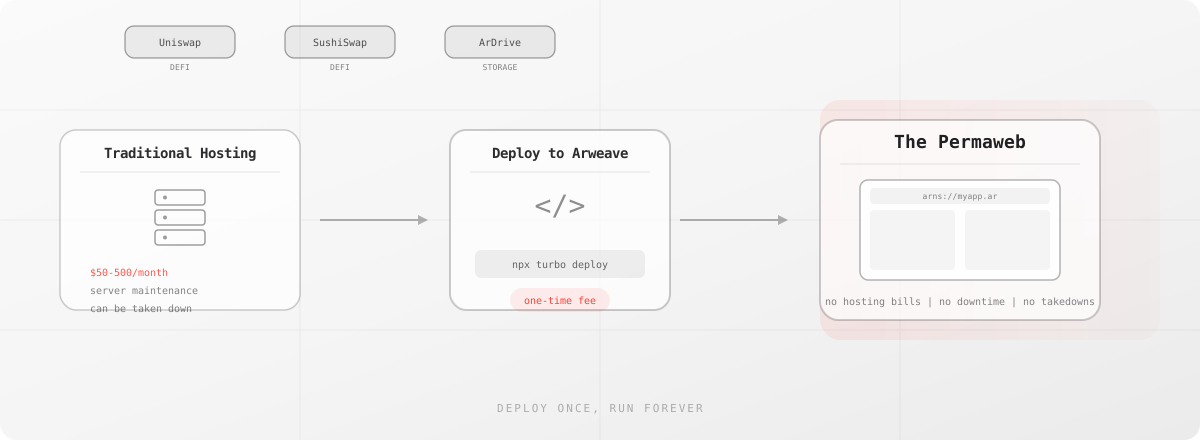
Why Would Anyone Deploy a Website Permanently?
Here's the thing: most websites disappear. Not eventually, but all the time. Studies show that 38% of web pages from 2013 are already gone. Links break. Companies fold. Servers get shut down when someone forgets to pay the bill.
Arweave fixes this by letting you deploy a web application once and have it run forever. No hosting bills. No server maintenance. No "we're sunsetting this service" emails.
Real Applications, Right Now
This isn't theoretical. Here are actual applications running on Arweave today:
ArDrive is like Dropbox, but permanent. Upload a file, get a link that works in 100 years. Their entire frontend runs on Arweave too, so the application itself can't disappear.
Permaswap is a decentralized exchange. You can swap tokens without worrying that the trading interface will get geo-blocked or taken down. The smart contracts are on-chain; the frontend is on the permaweb.
BazAR is an NFT marketplace built entirely on Arweave. The listings, the images, the marketplace frontend itself, all permanent.
And yes, arweave.org (this site you're reading) is deployed to the blockweave.
The DeFi Frontend Problem
Remember when Uniswap blocked 253 wallet addresses from their frontend? The smart contracts kept working. Anyone could still interact directly with Ethereum. But for regular users? They lost access to their own money.
The same happened when Tornado Cash got sanctioned. The protocol still exists on Ethereum. It will exist forever. But the frontend got taken down from traditional hosting.
This is why permanent frontends matter. A DeFi protocol should have an interface that's as unstoppable as the contracts themselves. Deploy the frontend to Arweave, and no government, no hosting provider, no corporate compliance team can take it down.
How Deployment Actually Works
You don't need to learn anything new. Build your app with whatever you already use: React, Vue, Svelte, Next.js static export, plain HTML. Then deploy it:
npx permaweb-deploy --ant-process <your-arns-process>
That command uploads your build folder to Arweave through Turbo, seeds it across gateways, and updates your ArNS domain. Your app is now permanent.
Or use ArDrive to upload manually. Or integrate the Turbo SDK directly into your CI pipeline. Deploy on every commit if you want; each version gets its own transaction ID and lives forever.
ArNS: Real Domains, Permanent Apps
Nobody wants to share a 43-character transaction ID. The Arweave Name System (ArNS) gives you readable domains:
https://myapp.arweave.net
Register a name through AR.IO, point it at your deployment transaction, and you're done. Update the pointer when you deploy new versions. The old versions stay accessible at their original transaction IDs; you get a permanent version history for free.
What Does It Actually Cost?
Traditional hosting: $5 to $500+ per month, forever, plus time maintaining servers.
Arweave: A one-time fee based on the size of your build. A typical React app (few MB) costs cents to deploy. Once.
For comparison, hosting a small app on AWS for 10 years would cost $600+ in hosting fees alone, not counting your time. The same app on Arweave costs maybe $0.50 total, permanently.
Versioning Is Built In
Every deployment creates a new transaction. This means:
- Version 1.0 lives at
arweave.net/abc123... - Version 1.1 lives at
arweave.net/def456... - ArNS points to the latest version
- Every previous version remains accessible forever
You never lose a deployment. Users can always access old versions. Auditors can verify exactly what code was running at any point in time. This isn't a feature you configure; it's just how the architecture works.
The Full Stack
Most apps need data storage too, not just hosting. On Arweave, you get both:
- Frontend: Your React/Vue/whatever app, deployed permanently
- Backend data: Files, user content, application state, all stored as transactions
- No infrastructure: No servers, no databases, no DevOps
Applications like ArDrive demonstrate this full-stack approach. The app is permanent. The data is permanent. Everything runs on the same underlying storage layer.
Getting Started
The easiest path:
- Build your app normally:
npm run build - Install the CLI:
npm install -g permaweb-deploy - Deploy:
permaweb-deploy
That's it. Your app is now on the permaweb. Works from any gateway worldwide. Stays up forever. Costs nothing ongoing.
For projects that want more control, the Turbo SDK offers programmatic uploads with instant finality. Under 500 KB? Free. Larger builds pay a small one-time fee in AR or fiat.
The web doesn't have to be ephemeral. Build once, deploy forever.